Busines Solutions

  • Subscribe to our RSS feed.
  • Twitter
  • StumbleUpon
  • Reddit
  • Facebook
  • Digg

Wednesday, 12 December 2012

12 Google+ Events Tips for 12/12/12

Posted on 12:12 by Unknown
Today, on 12/12/12--the last time this century that the day, month, and year are all the same--we’re bringing you and your business 12 tips on using Google+ Events. From the employee holiday party to your business’s New Year’s sale, check out ways that you can use Events not just to be a party pro, but also to engage your guests before, during, and after your event!
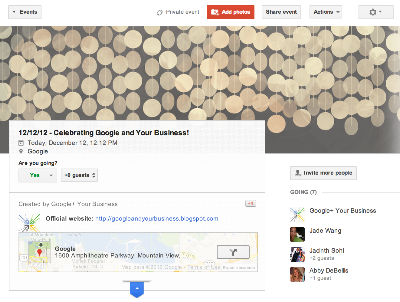
  1. Use Google+ to create an event that takes place either offline (such as an event in your store) or online (like a virtual meet and greet with your ownership team).
  2. Invite anyone you like. Guests who don’t use Google+ will be able to view and respond to the invitation. Guests who do use Google+ will be able to comment, invite others, and add photos, unless you disable these features.
  3. Choose a theme to add flare to your event and represent your business’s personality. Hosting your yearly company party? Having a holiday sale? Choose the theme that best fits your event.
  4. Manage your guest list by adding or removing invitees at any time. You can change guests’ rights, such as whether they can comment, add photos, or invite more people to your event by using the Actions menu.
  5. Add photos and videos to your event to share a collection of media with your guests before and after an event. By default, all guests can contribute to an event’s photo collection. For public events, anyone can contribute photos.
  6. Enable Party Mode so that Android mobile users can automatically upload their photos to the event page while the event is in progress.
  7. Add a hangout to your event so you can video chat with customers or co-workers before or during the event.
  8. Use Events on mobile for your Android phone to create and moderate your events, share photos and comments, and get directions to events, all while you’re on the go.
  9. Make your event public to increase visibility and allow more potential customers to find it and interact with the event’s page. For public events, anyone can say they’re going, add comments and photos, and invite others, unless these settings are disabled.
  10. Host an Event on air so that anyone can find and view your event, but the event page itself is more . Events on air have a limited guest list, and only invited guests can add photos and comments (unless this setting is disabled).
  11. From the Events homepage, click Find more events to browse public events and get ideas for yours. If you make your event public, others will be able to find your event this way as well.
  12. You can add additional information fields to your event, like a link to buy tickets, your business’s website, or a YouTube channel. When you’re creating your event, just click Event Options > Advanced > Show additional fields.
To learn more about Google+ events, visit the Help Center!

Posted by Abby DeBellis, Google and Your Business Blog Team
Read More
Posted in | No comments

Highlight Your Events on Google

Posted on 09:22 by Unknown
(summarized from the Webmaster Central blog)

At Google we’re making more and more use of structured data to provide enhanced search results, such as rich snippets and event calendars, that help users find your content. Until now, marking up your site’s HTML code has been the only way to indicate structured data to Google. However, we recognize that markup may be hard for some websites to deploy.

Today, we’re offering webmasters a simpler alternative: Data Highlighter. At initial launch, it’s available in English only and for structured data about events, such as concerts, sporting events, exhibitions, shows, and festivals. We’ll make Data Highlighter available for more languages and data types in the months ahead.

Data Highlighter is a point-and-click tool that can be used by anyone authorized for your site in Google Webmaster Tools. No changes to HTML code are required. Instead, you just use your mouse to highlight and “tag” each key piece of data on a few typical event pages on your site. Data Highlighter learns to recognize the formatting pattern of your site’s data, so when Google crawls your site, all your latest event listings become eligible for enhanced search results. This short video explains how the process works:


To get started with Data Highlighter, visit Webmaster Tools, select your site, click the “Optimization” link in the left sidebar, and click “Data Highlighter.”

If you have any questions, please read our Help Center article or ask us in the Webmaster Help Forum. Happy Highlighting!

Posted by Justin Boyan, Product Manager
Read More
Posted in | No comments

Tuesday, 11 December 2012

Steel + silicon = business success in Detroit

Posted on 09:25 by Unknown
Cross-posted from the Official Google Blog.

From time to time we invite guests to post about items of interest and are pleased to have Linzie Venegas join us today. Linzie is head of sales and marketing for Ideal Shield, a manufacturing company in Detroit, Mich. that specializes in bumper post sleeves. Based in a city forged in tradition and steel, Ideal Shield has seen great success on the web—a story Linzie tells us in this post. -Ed.

When my great-grandparents moved from Mexico to Detroit in 1917, they were looking for a better life. They had no idea that one day their grandson, my father Frank Venegas, would invent a product and start a business that would help transform their adopted hometown. Thanks to my dad’s hard work and a little help from the web, that’s exactly what Ideal Shield has done.

Ideal Shield specializes in manufacturing bumper post sleeves. You may have seen these around—they’re colorful covers that slide over the steel pipes that keep cars from running into buildings. As a young child, my first job at Ideal was to assemble mailers for potential customers. Our mailers were unique—I would place a pack of jelly beans into each envelope. Talk about a great way to get a high “clickthrough rate!” Today, I head sales and marketing for the company, and we’ve taken our family business online with phenomenal results.


Ideal Shield’s father-daughter team Frank and Linzie Venegas in the factory surrounded by bumper post sleeves and guard rails.
We began using Google AdWords in 2004 to help potential customers find our product because many people didn’t know what it was. We were drawn to AdWords because everyone could see our ads—but we only had to pay for the customers who clicked through to our website. We also found that the leads were very qualified and had a higher close rate than leads from other sources. So far this year, for every $1 we've spent on AdWords we’ve gotten back $22. We’ve been able to have great success—without jelly beans!—using Google AdWords.

The energy we’ve put into our online presence has produced tremendous growth for our business; we’ve been able to grow our workforce by 20 percent. We’ve also focused on building our local community of Southwest Detroit. Each year we hire many interns from the local high school, Detroit Cristo Rey, and teach them skills that will last a lifetime. We’ve outfitted the junior and senior classes at Detroit Cristo Rey with Chromebooks so that they’ll have access to the power of the web anywhere, and many teachers there use the free Google Apps for Education suite with their students. This year, we were proud to hear that Detroit Cristo Rey achieved a 100% graduation rate and a 100% college acceptance rate. We also work with the Michigan Minority Business Development Council to teach other small businesses in the community the importance of an online strategy and how the web can help small businesses thrive.

My dad started Ideal with himself, my mother and a couple of laborers; today this family business has more than 35 employees and annual sales of $14 million. With help from the web, his hard work, determination and “out of the box” thinking have made Ideal a symbol of strength and renewal in Southwest Detroit. My father has always told me that if you take care of the community, the community will take care of you. Detroit is our community—it’s our heart, it’s our home. We’ve been surprised and delighted at how much the web has contributed to Ideal Shield, and we’re happy to share that success with Detroit. We can’t wait to do more!


Posted by Linzie Venegas, Head of Sales and Marketing, Ideal Shield Detroit
Read More
Posted in | No comments

Monday, 10 December 2012

Year in Review: Top 3 Posts - 3rd Place

Posted on 12:28 by Unknown


It's well into December, New Year's Eve is just a few weeks away, and like many others, we're thinking about the year in review. Through the end of the month, we'll re-share your top 3 favorite posts from the Google and Your Business blog in 2012. Coming in at number 3 is a piece from our 10 in 10 series--our top 10 tips for using Google Chrome.

*      *      *

Want to get even faster at work? Use Google Chrome shortcuts to start working as fast as you browse the web:

  1. While reading online, have you ever seen a word or phrase that you wanted to learn more about? Next time, just highlight the term(s) and then drag it to your tabstrip to the right or left of your current tab--a new tab will open with search results for the highlighted text. You can also try the Dictionary extension so when you highlight a word the definition will hover over it. 
  2. Have a site (or a few) you always keep open, like Gmail or Rdio? You can pin those tabs so that they open the next time you launch Chrome. To pin a tab, right-click on it then select “Pin Tab”.  
  3. Sign in to Chrome to access your bookmarks and quickly sync your tabs on any of your other gadgets where you’re signed into Chrome. Just go to the “Other devices” menu when you open a new tab to find them. The back and forward buttons will even work, so you can pick up browsing right where you left off. 
  4. Try using incognito windows to browse in stealth mode. With Incognito Mode, pages you view won't appear in your browser history or search history, and they won't leave other traces, like cookies, on your computer after you close the incognito window 
  5. Want to hide your bookmarks bar? You can also use the keyboard shortcuts Ctrl+Shift+B (Windows and Chrome OS) and ⌘-Shift-B (Mac) to toggle the bar on and off. 
  6. To save a webpage as a PDF, press Ctrl + p (Mac: Cmd + p) to bring up the print dialogue, then Destination > Change. 
  7. Need even more space to browse? You can toggle full-screen mode with these handy keyboard shortcuts: Fullscreen Key on a Chromebook, F11 on Windows & Linux, and Cmd+Shift+F on a Mac. 
  8. Accidentally close a window? Just use the keyboard shortcut Ctrl+Shift+t to open the last tab you closed. Keep using this shortcut to open your previous tabs. 
  9. Bookmarks are just a click away. Like a page? Click on the Star next to the omnibox, and the page is automatically bookmarked. 
  10. Use apps from the Chrome Web Store to do things like get notifications, take notes, edit screenshots, and more. 
You can learn even more tips for using Google Chrome by checking out the help center or Chrome’s Google+ page.

Posted by Jacky Hayward, Google Chrome Team 
Read More
Posted in | No comments

Friday, 7 December 2012

HOAliday Series: Keeping Ads from Going Dark over the Holidays

Posted on 09:36 by Unknown
AdWords Specialists Courtney Pannell, Ben Oberg,  and Brette Henderson hosted a Hangout on Air last week as the first installment of the HOAliday three-part series.

During the Hangout, we talked about some tips to keep your ads running during this crucial time for your business. We first explained how to avoid in ad delivery when you’d like to change your ad text to show a holiday promotion or deal. We then shared a few of our best tips with automated rules and billing best practices to make advertising for your business easy during a season that you should get to enjoy, too!

To watch the full 20-minute Hangout on Air, visit the Google Business YouTube channel.


To learn more about how to get started with AdWords, visit our Help Center, check out the AdWords Community forum, or call us at 866-2-GOOGLE if you already have an AdWords account.

And remember to tune in to the live stream of our next Hangout on Air at 11 a.m. PDT, December 13th, when we discuss how to create standout ads during the busy holiday season.

Stay tuned! HOA HOA HOA and to all a good day/night!

Posted by Courtney Pannell, Ben Oberg,  and Brette Henderson, AdWords Team
Read More
Posted in | No comments

Wednesday, 5 December 2012

Announcing a new Google Ads Hangout on Air series - “Happy HOAlidays”

Posted on 16:10 by Unknown
(This post has been cross-published from the AdWords blog)


The holidays are crunch time for many advertisers out there, so we’re introducing a new holly, jolly Hangout on Air series on the Google Ads +Page. In this three-part series, AdWords specialists from the 866-2-GOOGLE support team will cover three important topics surrounding your AdWords performance during the holiday season.

December 6 at 11 AM PDT: How to keep your ads from going dark during the holidays
We’ll discuss tips and tricks for how to manage your account effectively when you might be out of the office on holiday break.

December 13 at 11 AM PDT: How to create stand-out ads during the competitive holiday season
We’ll share the best strategies for setting yourself apart from your competition.

December 20 at 11 AM PDT: How to maintain the holiday momentum
We’ll tell you how to assess your holiday performance and engage your new customer base into the new year.

To join the Hangouts, just sign into Google+ and add the Google Ads +Page to your circles. Each week we’ll put up a post soliciting your questions. Then, on Thursday, navigate to your Stream where you’ll be able to view our Hangout live with just one click. See you there!

Posted by Courtney Pannell & Divya Vishwanath, AdWords Support Team
Read More
Posted in | No comments

Tuesday, 4 December 2012

Build Your Digital Brand with Google+ Webinar

Posted on 13:35 by Unknown


The Google+ platform provides a fresh canvas for building and strengthening your digital brand, tying into all the marketing you already do with Google. From launching a new product using Google+ pages to engaging with your community of enthusiasts over Hangouts, join our Learn with Google webinar this Thursday for a look at ways your company can build its brand using social. Sign up on our webinar page to attend: Building a Digital Brand with Google+ (Thurs, Dec 6, 10am PT / 1pm ET)

After the Hangout, we’ll host a live Q&A with members of the Google+ team to answer questions about building a brand with Google+. RSVP on the Google+ Event page and add your questions as comments on that page.

With more than 100 monthly million active Google+ users, the time is right to focus on building your digital brand presence via the platform. Google+ has seen a wealth of brands engaging with users in creative, interactive ways. In fact, brands created more than 1 million Google+ pages in just a few months. For instance:
  • H&M -- The retail clothing company, with more than 2 million Google+ followers, uses tailored content, images and video to bring its fashions and lifestyle to life on the platform. They’ve also utilized Ripples to identify their trendsetters and saw a 22% clickthrough rate boost after implementing social extensions in AdWords.
  • Cadbury -- The chocolate maker has reached a following of nearly 3 million users with a combination of creative posts, Hangouts on Air and even the launch of their Dairy Milk Bubbly bar. They’ve also installed the Google+ badge on the company’s web homepage, making it easy as chocolate to follow the brand.
Like the ideas here? Log on Thursday to learn more about how to create, capture and sustain demand for your brand using Google+. And if you’re going to miss this while you’re at SMX Social in Las Vegas next week, check back at the webinars page later for a recording of the webinar.

Posted by the Learn With Google Team
Read More
Posted in | No comments
Newer Posts Older Posts Home
Subscribe to: Posts (Atom)

Popular Posts

  • Helping small businesses grow on the web: Teaming up with Chase for Mission Main Street Grants
    We know that every small business has big ideas for what they want to do next. Maybe you’d like to expand your store, hire more employees, o...
  • Announcing Reviews in Google Places for Business
    People come to Google to search for information about local shops and restaurants so they can make the best plans and purchases. That’s why ...
  • Sending your customers holiday cheer with Google Maps
    I love walking around my neighborhood during the holiday season and seeing all of the winter and holiday decorations adorning the storefront...
  • 10 in 10: Gmail
    Editor’s note: For the 10th month of the year, we’ll be sharing 10 tips each week for using a different Google product. Our first post featu...
  • Five for Drive: Tips for Getting Started with Google Drive
    Editor’s note: Over the next few weeks, we’ll be sharing tips on how your business can get the most out of Google Drive. This week, learn th...
  • The more you know: switching to Gmail like a pro
    [Cross-posted from the Google Enterprise Blog ] Every day, tens of thousands of people switch from Microsoft Outlook® and other client-based...
  • Check out your new image ads from the AdWords Display Ad Builder
    ( Cross-posted on the Inside AdWords blog .) Image and video ads on the Google Display Network can have a strong impact on the success of ...
  • Manage multiple locations more easily with a new tool for Google Places
    Businesses with multiple locations have a big task in front of them when trying to manage their online presence. How can they connect their ...
  • Going Google across the 50 States: Pharmacy Development Services communicating from Florida and beyond
    [Cross-posted from the Google Enterprise Blog ] Editor’s note: Over 3 million businesses have adopted Google Apps . To share their stories,...
  • Help Desk Hangouts: Engaging with your customers using social media
    Editor’s note : Each week on the Google+ Your Business page, we’re putting you in touch with Googlers and users who can help you as a busin...

Categories

  • AdSense
  • AdWords
  • Adwords Express
  • Apps Marketplace
  • Business Photos
  • Chromebooks
  • consumer surveys
  • Enhanced Campaigns
  • Events
  • Gmail
  • GoMo
  • Google AdSense
  • Google AdWords
  • Google Analytics
  • Google App Engine
  • Google Apps
  • Google Apps Marketplace
  • Google Calendar
  • Google Docs
  • Google Forms
  • Google Maps
  • Google Offers
  • Google Places
  • Google Sites
  • Google Tags
  • Google+
  • Google+ stories
  • googlenew
  • Help Desk Hangouts On Air
  • Hotpot
  • Learn with Google
  • mobile
  • Newsletter
  • Online security
  • Picasa
  • Street View
  • TalkBin
  • Webmaster Academy
  • YouTube

Blog Archive

  • ▼  2013 (45)
    • ▼  November (1)
      • Announcing Reviews in Google Places for Business
    • ►  October (4)
    • ►  September (1)
    • ►  August (2)
    • ►  July (5)
    • ►  June (2)
    • ►  May (9)
    • ►  April (3)
    • ►  March (4)
    • ►  February (4)
    • ►  January (10)
  • ►  2012 (120)
    • ►  December (15)
    • ►  November (9)
    • ►  October (15)
    • ►  September (13)
    • ►  August (10)
    • ►  July (3)
    • ►  June (10)
    • ►  May (17)
    • ►  April (10)
    • ►  March (9)
    • ►  February (7)
    • ►  January (2)
  • ►  2011 (70)
    • ►  December (3)
    • ►  November (2)
    • ►  October (6)
    • ►  September (3)
    • ►  August (2)
    • ►  July (1)
    • ►  June (5)
    • ►  May (12)
    • ►  April (9)
    • ►  March (8)
    • ►  February (12)
    • ►  January (7)
  • ►  2010 (104)
    • ►  December (25)
    • ►  November (24)
    • ►  October (17)
    • ►  September (20)
    • ►  August (18)
Powered by Blogger.

About Me

Unknown
View my complete profile