Busines Solutions

  • Subscribe to our RSS feed.
  • Twitter
  • StumbleUpon
  • Reddit
  • Facebook
  • Digg

Friday, 23 March 2012

Help Desk Hangouts: Learn how your business can use Hangouts to engage and collaborate

Posted on 14:09 by Unknown
Editor’s note: Each week on the Google+ Your Business page, we’re putting you in touch with Googlers and users who can help you as a business owner get the most out of our products and features.

In our latest Help Desk Hangout On Air, we discussed Google+ Hangouts — a topic many of you wanted to know more about (how to get started, ideas for what to cover in your Hangouts, and so on). With special guests Teresa Wu of the Google Docs team, and Hangouts power users Seth David and Tom Rolfson, we talked about how you can use Hangouts to engage customers and collaborate with your teammates. If you missed it, you can watch the full hour-long Hangout on the Google Business YouTube channel (really great tips!):


We collected questions via the Google+ Your Business page and tried to answer as many as we could in the Hangout. Here are a few of the questions we addressed:

Yifat: If a business page doesn't have many followers and they open a public Hangout, where does it appear and can anyone join (even people who haven't circled them yet)?

A notification to join the Hangout appears only to those who have added the page to their circles (they’ll see it in the Stream), but anyone with the link can join the Hangout.

Thorben: Are you still planning on making Hangouts On Air available for everybody?

We’re definitely still hoping to make this more widely accessible. Thanks for being patient!

Nadra: I'm looking forward to using Hangouts for event promotion. I'm curious about the different nuances of launching Hangouts before, during and after an event.

Hangouts are a great way to give others insight into an event, especially during the live show (be sure test the sound quality ahead of time to make sure everything’s a-OK). Before an event, you could use the Hangout to start building interest by giving sneak previews to guests, and after the event, use a Hangout to recap the highlights and showcase follow-up interviews.

Eric: How can we embed Hangout info on our website? And help people to pre-register? Can we stream the live Hangout to another web property like our web site?

Embedding a Hangout and streaming on your own web property aren’t possible at the moment, but it’s a common feature request that we get from users and one the team is aware of. As for pre-registering, you can ask the followers of your page to leave a comment if they’d like to be invited to attend, or create a Google form to collect the names of participants.

Barbara: I've been using Hangouts quite a bit but even in smaller groups we've struggled with disturbing noise interferences we couldn't really explain. How can we overcome such seemingly mundane but important difficulties?

Make sure you have a dedicated quiet room for participants in the Hangout. Use microphones and headphones to improve sound and audio quality, and ask participants that when not speaking, hit the “Mute” button at the top right of the Hangout screen.

To learn more about how to get started with Google+ Hangouts, visit our Help Center. And remember to tune in to the live stream of our next Hangout at 11 a.m. PDT Wednesday March 28, as we discuss how you can help the right customers find your business with AdWords. We’ll be collecting your AdWords questions early next week on the Google+ Your Business page.

Posted by Vanessa Schneider, Google Places community manager
Read More
Posted in Help Desk Hangouts On Air | No comments

Thursday, 22 March 2012

Google+ page stories: The Pablove Foundation

Posted on 15:13 by Unknown
Editor’s Note: This is the sixth in a series of posts about small businesses on Google+ and their tips and tricks for managing a great page. Visit our YouTube channel to see all the videos in this series and join the discussion on the Google+ Your Business page. 

Meet The Pablove Foundation, whose mission is to fund pediatric cancer research, educate and empower cancer families, and improve the quality of life for children living with cancer. Watch as Jo Ann Thrailkill, Pablove’s Executive Director, uses Google+ to contribute to the global Pablove movement to fight childhood cancer with love.


Google+ Ripples creates an interactive graphic of the public shares of any public post or URL on Google+ to show you how it has moved through the network. Watch as Jo Ann uses Ripples to discover new supporters of The Pablove Foundation:


Ripples shows you:
  • Who has publicly shared a post or URL and the comments they’ve made
  • How a post or URL was shared over time
  • Statistics on how a post or URL was shared
Want to learn more? Check out our Help Center for specific steps on how to use Ripples, and visit the Google+ Your Business site for more Google+ tips and tricks. You can watch all our small business stories on YouTube.

What interesting people and connections have you discovered through Ripples? Join the discussion on the Google+ Your Business page and tag your posts #mybusinessstory.

Posted by Evelyn Lee, Google+ Pages Associate Product Marketing Manager
Read More
Posted in Google+ stories | No comments

Monday, 19 March 2012

Learn how Google can help your business with our new Help Desk Hangouts on Air series

Posted on 13:11 by Unknown
You’re looking to grow your business, and we offer a ton of tools to help you do just that. But sometimes, you need a little help learning all the options and getting started. That’s why this week on the Google+ Your Business page, we’ve launched a new series of Help Desk Hangouts On Air to put you in touch with teams who can help you get the most out of our products and features.

What’s a Hangout On Air? Well, Hangouts are a video group chat with a limit of 10 participants. Hangouts On Air are special Hangouts that allow you to broadcast that 10-person Hangout to many people and record it for future viewing.

To kick things off, we asked Justin Cutroni of the Google Analytics team (and author of the blog Analytics Talk) to show us how business owners can use Analytics to track their advertising campaigns, website performance and see how users are getting to their site (e-mail, social media, referrals). If you missed it, you can watch the full hour-long Hangout on the Google Business YouTube channel:


Here’s how the video breaks down:
  • Intros - Hi, Mom! (2 mins)
  • The basics (25 mins)
    • What is Analytics?
    • Why, as a business owner, should I use Analytics?
    • How do I get started?
    • How do I read the reporting information? (Here Justin walks us through the features of an active account.)
  • Q&A (25 mins)
  • Wrapup (2 mins)
Earlier in the week, we asked you to share with us your Analytics questions — and you had plenty! Here are just some of the questions Justin addressed in the Hangout:

Kenneth: Is there a threat in respect to data privacy?
We take privacy very seriously at Google. The only person that has access to your Google Analytics data is you. You can also grant other people access to your Analytics data, but that’s up to you.

Martynas: Is there a plan to update the administration part of GA? We need more levels: creator, administrator, manager, reader.
Excellent feature request, and it relates to the question above. We get this question often and know that the current model is limiting. We are working hard to figure out the best user model for Analytics.

Lea: When oh when will export to PDF be available in the new version of Analytics?
We hear you! It’s coming back very soon. We’re sorry it’s taken so long to add this feature to the new version of Google Analytics.

Jeremy: What are the plans for integrating Google Analytics with Site Optimizer?
Another great question. For those of you that don’t know, Website Optimizer is a website testing tool. You can use it to test different variations of your website, like landing pages or the checkout process. We’ve heard our users loud and clear that Website Optimizer would be a lot more useful as part of Google Analytics. Stay tuned ...

Connie: Is there a good WordPress plug-in for adding GA code to a blog?
Plug-ins! Justin’s favorite, we learned yesterday in the Hangout. There are some great ones out there, especially for WordPress. Check out Google Analytics for WordPress.

Raphael: Can you tell us more about the benefits of using Analytics for tracking mobile apps?
You can absolutely track apps with Google Analytics. We have two SDKs, one for Android and one for iOS, that make it easy to  track how people use an app. If you’re going to use GA to track apps you should also understand Event Tracking and Custom Variables. These two features are very useful when tracking apps.


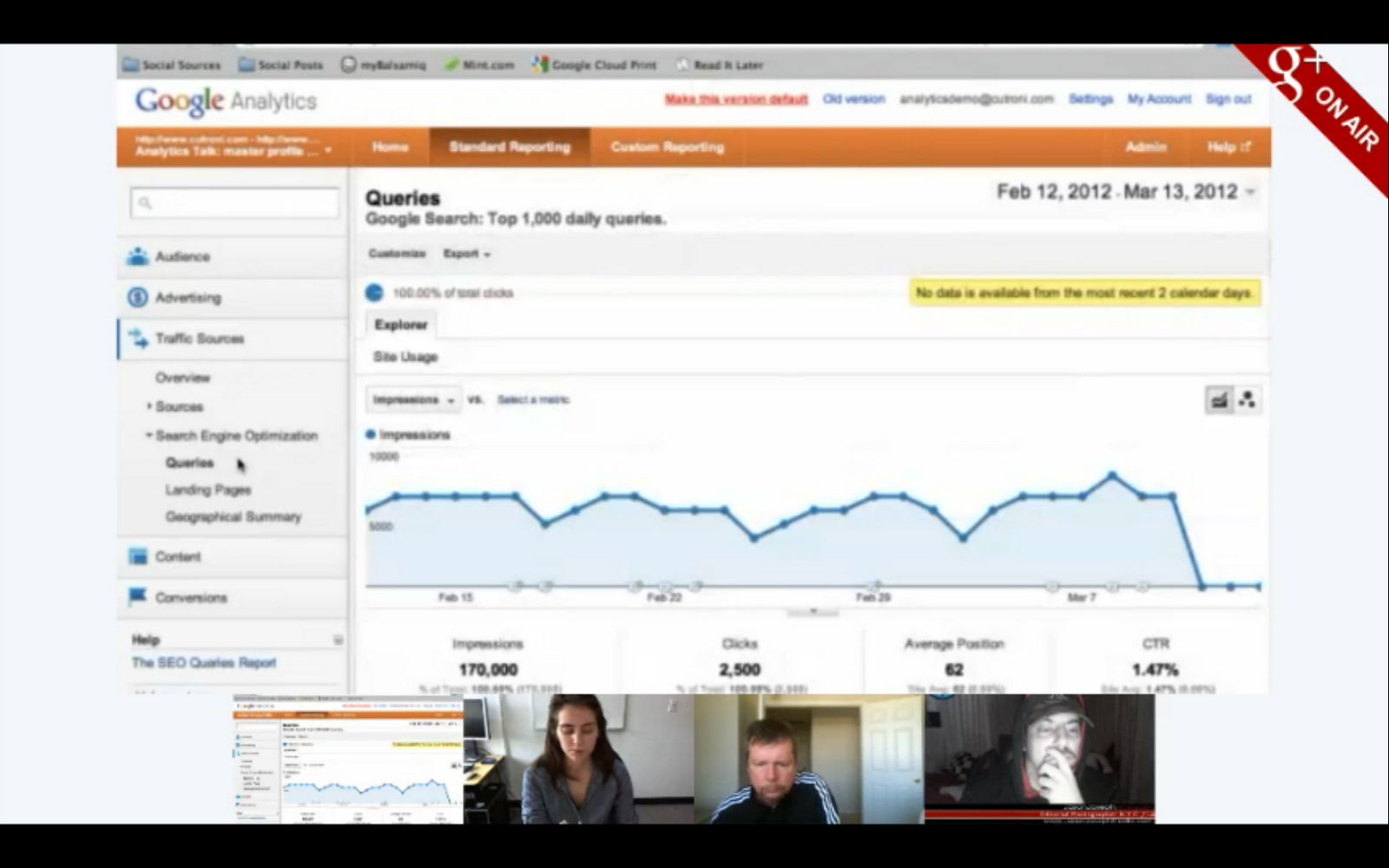
Justin shows us a feature that tells you how often you show up in Google’s organic search results and the number of click-throughs that you get.

To learn more about how to get started with Google Analytics, visit our Help Center. And remember to tune in to the live stream of our next Hangout at 11 a.m. PDT Wednesday, as we discuss how to use Hangouts (something a bunch of you guys have asked us to talk about!). We’ll be collecting your Hangout questions today on the Google+ Your Business page.

Posted by Vanessa Schneider, Google Places community manager
Read More
Posted in Google Analytics, Help Desk Hangouts On Air | No comments

Tuesday, 13 March 2012

Google+ page stories: Birds Barbershop

Posted on 10:11 by Unknown
Editor’s Note: This is the fifth in a series of posts about small businesses on Google+ and their tips and tricks for managing a great page. Visit our YouTube channel to see all the videos in this series and join the discussion on the Google+ Your Business page. 

Meet Birds Barbershop, a collection of five hair salons in Austin, Texas. Jayson Rapaport and Michael Portman dreamed of reinterpreting the old school barbershop for a new generation through affordable, quality cuts, free beer — and now Google+. Watch this pair of big thinking entrepreneurs as they use Google+ to speak directly with their regulars and create a virtual lookbook using Google+ photos.


Google+ Pages is a great tool for coordinating internal communications. In the video below, see how Michael and Jayson use their page to expand to a new location.


On Google+, users get unlimited photo and video uploads — a great opportunity to show off your business’s space, new merchandise, or a recent event you hosted. Here are some quick tips on how to create albums of beautiful photos to show off your business:
  • Edit your photos with basic features like rotating images or using auto-fix. You can use the Creative Kit for more advanced edits like adding effects and text to your pictures.
  • Manage your images quickly by using the photos icon at the top of your Google+ dashboard to change the share settings for all of your albums in one place.
  • Change the visibility of your albums so you can pick who sees what. For example, you might want to share photo of your products with your customers, and pictures from company events with just your employees.
Want to learn more? Visit the Google+ Your Business site, and stay tuned for more Google+ stories and tips from small businesses. Also check out our Help Center content for specific steps on how to use photos in your posts. You can also watch all our Google+ page stories on YouTube.

How do you use photos and videos on Google+ to better connect with your customers? Join the discussion on the Google+ Your Business page and tag your posts #mybusinessstory.

Posted by Evelyn Lee, Google+ Pages Associate Product Marketing Manager
Read More
Posted in Google+ stories | No comments

Thursday, 8 March 2012

Go inside with indoor maps on Google Maps for Android

Posted on 09:05 by Unknown
Google Maps helps you orient yourself in the world around you, and as of a few months ago, began to help you do this indoors as well. Indoor maps, a Google Maps feature now available for Android mobile users, shows detailed building floor plans where available. This helps your customers using Android phones figure out where they are and what’s around them in your shop, and enables new customers to check out the layout of your location before they even visit.

Indoor maps were initially released with a limited set of partners (mainly large retailers, airports, and transit stations), and now we’re looking to bring these maps to more places where users might benefit from being able to quickly see floor plans labeled with ATMs, restrooms, departments, and more. You can upload your venue’s floor plan to the Google Maps floor plans tool (make sure you have the necessary permissions and follow our content guidelines). If accepted, we’ll format it to appear on Google Maps for Android. Your floor plan can be a blueprint, a digital image from your website or a brochure. If you only have a physical copy of the floor plan, you can scan or take a picture of it and use that image instead. Easy!


Sofia Italian Steakhouse, West Roxbury, MA

If your store is located within a larger indoor space, you’re still able to participate. Talk to your property manager or building owner about uploading a floor plan, since improved and more detailed information can help all the businesses in your establishment.

This feature is currently available in the U.S. and Japan — we’ll keep you posted as we expand. For additional questions or information, please email floorplans@google.com

Posted by Mac Smith, Senior User Researcher
Read More
Posted in Google Maps | No comments

Wednesday, 7 March 2012

Google+ page stories: Loluma

Posted on 08:00 by Unknown
Editor’s Note: This is the fourth in a series of posts about small businesses on Google+ and their tips and tricks for managing a great page. Visit our YouTube channel to see all the videos in this series and join the discussion on the Google+ Your Business page. 

Meet Loluma, a team of artists that designs one-of-a-kind events. Sha Sha Harnik leads the team, as they provide design direction and coordination for wedding and event clients. In the video below, see how she uses Google+ not only to create moments, but also to capture and share them with her wedding clients.


Google+ Hangouts allow you to collaborate through group video chat. Watch Sha Sha hangout with a family of stealthy birthday planners to help them create the ultimate surprise party for their grandma’s 80th birthday.


Try Hangouts with Extras for even more collaborative features. With Extras, you can:

  • Share your screen. With screen sharing, you can let other Hangout attendees see what’s on your screen. Want to share a website with your colleagues, or a design you’re working on with clients? Just select the “Share screen” button at the top.
  • Collaborate on documents in real time. You can share notes and even work on documents at the same time. Perfect for brainstorming sessions!

To get started, select the “Start a hangout” button on the navigation bar along the right. In the yellow bar at the bottom of the pop-up window, select “Hangouts with extras,” and get started!

Want to learn more? Visit the Google+ Your Business site, and stay tuned for more Google+ stories and tips from small businesses.

How do you use Hangouts to collaborate with your co-workers and customers? Join the discussion on the Google+ Your Business page and tag your posts #mybusinessstory.

Posted by Evelyn Lee, Google+ Pages Associate Product Marketing Manager
Read More
Posted in Google+ stories | No comments

Monday, 5 March 2012

Introducing the Learn with Google Webinar Program

Posted on 09:49 by Unknown
(Cross-posted on the Inside AdWords blog.) 

At Google, one of our goals is to help make the web work for your business. Today weíre introducing the Learn with Google webinar program that does just that, by sharing best practices and tips across a variety of products, including search ads, mobile ads, display ads, YouTube and Google Analytics.

Weíre kicking off the program with eight live webinars in March:

  • March 13 at 10am PDT: 5 Tips to Start Marketing your Business with Video
  • March 14 at 10am PDT: Introduction to the Google Display Network
  • March 15 at 10am PDT: GoMo: Mobilize your Site and Maximize your Advertising
  • March 20 at 10am PDT: Understanding Mobile Ads Across Marketing Objectives
  • March 21 at 10am PDT: Reaching Your Goals with Google Analytics
  • March 22 at 10am PDT: GoMo for Publishers
  • March 27 at 10am PDT: Manage Large AdWords Campaigns with Less Effort
  • March 28 at 10am PDT: 3 Tips to Get More out of your Video Advertising Campaigns
Check out our new webinar page to register for any of the sessions or to access on-demand webinars. Weíll be adding new webinars as theyíre scheduled, so check back regularly for updates. You can also stay up-to-date on the schedule by downloading our Learn with Google Webinar calendar to automatically see upcoming webinars in your Google Calendar.

Whether your goal is to engage the right customers at the right time, make better decisions faster, or get the most from your marketing dollars, we hope that youíll use these tips and how-toís to maximize the impact of digital and grow your business. Weíre looking forward to having you join us!


Posted by Erica Tsai, Product Marketing Manager
Read More
Posted in AdWords, Google Analytics, Learn with Google | No comments
Newer Posts Older Posts Home
Subscribe to: Posts (Atom)

Popular Posts

  • Helping small businesses grow on the web: Teaming up with Chase for Mission Main Street Grants
    We know that every small business has big ideas for what they want to do next. Maybe you’d like to expand your store, hire more employees, o...
  • Announcing Reviews in Google Places for Business
    People come to Google to search for information about local shops and restaurants so they can make the best plans and purchases. That’s why ...
  • Sending your customers holiday cheer with Google Maps
    I love walking around my neighborhood during the holiday season and seeing all of the winter and holiday decorations adorning the storefront...
  • 10 in 10: Gmail
    Editor’s note: For the 10th month of the year, we’ll be sharing 10 tips each week for using a different Google product. Our first post featu...
  • Five for Drive: Tips for Getting Started with Google Drive
    Editor’s note: Over the next few weeks, we’ll be sharing tips on how your business can get the most out of Google Drive. This week, learn th...
  • The more you know: switching to Gmail like a pro
    [Cross-posted from the Google Enterprise Blog ] Every day, tens of thousands of people switch from Microsoft Outlook® and other client-based...
  • Check out your new image ads from the AdWords Display Ad Builder
    ( Cross-posted on the Inside AdWords blog .) Image and video ads on the Google Display Network can have a strong impact on the success of ...
  • Manage multiple locations more easily with a new tool for Google Places
    Businesses with multiple locations have a big task in front of them when trying to manage their online presence. How can they connect their ...
  • Going Google across the 50 States: Pharmacy Development Services communicating from Florida and beyond
    [Cross-posted from the Google Enterprise Blog ] Editor’s note: Over 3 million businesses have adopted Google Apps . To share their stories,...
  • Help Desk Hangouts: Engaging with your customers using social media
    Editor’s note : Each week on the Google+ Your Business page, we’re putting you in touch with Googlers and users who can help you as a busin...

Categories

  • AdSense
  • AdWords
  • Adwords Express
  • Apps Marketplace
  • Business Photos
  • Chromebooks
  • consumer surveys
  • Enhanced Campaigns
  • Events
  • Gmail
  • GoMo
  • Google AdSense
  • Google AdWords
  • Google Analytics
  • Google App Engine
  • Google Apps
  • Google Apps Marketplace
  • Google Calendar
  • Google Docs
  • Google Forms
  • Google Maps
  • Google Offers
  • Google Places
  • Google Sites
  • Google Tags
  • Google+
  • Google+ stories
  • googlenew
  • Help Desk Hangouts On Air
  • Hotpot
  • Learn with Google
  • mobile
  • Newsletter
  • Online security
  • Picasa
  • Street View
  • TalkBin
  • Webmaster Academy
  • YouTube

Blog Archive

  • ▼  2013 (45)
    • ▼  November (1)
      • Announcing Reviews in Google Places for Business
    • ►  October (4)
    • ►  September (1)
    • ►  August (2)
    • ►  July (5)
    • ►  June (2)
    • ►  May (9)
    • ►  April (3)
    • ►  March (4)
    • ►  February (4)
    • ►  January (10)
  • ►  2012 (120)
    • ►  December (15)
    • ►  November (9)
    • ►  October (15)
    • ►  September (13)
    • ►  August (10)
    • ►  July (3)
    • ►  June (10)
    • ►  May (17)
    • ►  April (10)
    • ►  March (9)
    • ►  February (7)
    • ►  January (2)
  • ►  2011 (70)
    • ►  December (3)
    • ►  November (2)
    • ►  October (6)
    • ►  September (3)
    • ►  August (2)
    • ►  July (1)
    • ►  June (5)
    • ►  May (12)
    • ►  April (9)
    • ►  March (8)
    • ►  February (12)
    • ►  January (7)
  • ►  2010 (104)
    • ►  December (25)
    • ►  November (24)
    • ►  October (17)
    • ►  September (20)
    • ►  August (18)
Powered by Blogger.

About Me

Unknown
View my complete profile