Busines Solutions

  • Subscribe to our RSS feed.
  • Twitter
  • StumbleUpon
  • Reddit
  • Facebook
  • Digg

Friday, 3 February 2012

Connect with Googlers and users in our Google+ Help Desk Hangouts

Posted on 12:45 by Unknown
There’s nothing quite like talking to your customers face to face—being able to hear their feedback and questions directly, and strengthening those relationships. A message we come back to again and again on the Small Business Blog is the importance of connecting with and understanding your customers, whether you’re a small business or a company as large as Google. And so, a few months ago, the Google+ Pages team decided to practice what we preach by giving Page admins an opportunity to connect with us via a Google+ Hangout.

The response was overwhelming. Over the course of three hours, our team met with more than 350 Google+ users. We got to know one another, collected feedback, and listened to what business owners had to say about Google+ Pages.


Yesterday we hosted another round of these Help Desk Hangouts. We know not everyone can always make it for these, so we’ve collected a few of the more common questions we hear from business owners and answered them here:

Why should I have a Google+ Page?

Where to begin? Google+ offers you an incredible array of tools designed to help you get closer than ever to your customers. Use Hangouts to meet face-to-face, use circles to tailor your message to different audiences, and Ripples to figure out who’s sharing your content. You can also use Search on Google+ to tune into the conversation in real-time. Finally, Google+ is growing every day, and you want to make sure you’re where your customers are going.

How can I get people to follow me on Google+?

There are a number of things you can do here. Be sure to cross-promote. Put a brand badge on your website to let your customers add your page directly to their circles. Include links to your page in the e-mails you send and even create an “Add Us On Google+” sign to put up in your store. Second, identify the people who matter in your industry. Find them with search and Ripples, and build relationships from there. By resharing your content, they can help you build your audience. Third, and most importantly, post quality, creative, and exclusive content on your page. People will spread the word about things that excite, engage, and impact them.

Any other advice for creating good content for my page?

Google+ is fantastic for sharing videos and photos, so you should use rich media to spice up your updates. You should also use an informal, conversational tone. It goes a long way toward making your page seem approachable. Include calls to action that encourage your customers to engage — ask them questions about what they’re looking for, what they like and any feedback they may have about your product and services. Post information they can’t get anywhere else — let them know that Google+ is the place to look for the most up-to-date information about your company. And most importantly, just have fun! We’re learning too, so we’d love to hear what works (and what doesn’t) for you and your page.

What’s coming soon on Google+ Pages?

Our team is hard at work growing Google+ Pages, and we have a lot to do—a challenge we’re excited to take on. There’s lot more to come, so stay tuned in the coming months.

Thanks to those of you who joined our Hangouts yesterday, and for those of you who missed us, we hope you can drop by next time. Follow the Google+ Your Business page for updates about future Hangouts and new feature announcements.

Posted by Toby Stein, Google+ Community Manager
Read More
Posted in Google+ | No comments

Wednesday, 1 February 2012

Tell your business story with Google+ Pages

Posted on 09:00 by Unknown
When we launched Google+ Pages last November, we saw more than a million businesses create new profiles to better connect with their customers. Page owners have been hosting Hangouts, updating their customers on the latest news and deals, and sharing exclusive photos and videos. We’ve loved the creativity and wanted to share what some business owners have been learning as they use Google+.

Over the next couple months, we’ll be introducing you to some cool small businesses who’ve recently joined Google+, both here on the Small Business Blog and on the Google+ Your Business page. We’ll be sharing what they’ve learned along with their tips and tricks for managing a great page.

First up: Meet Best Made Company, a group of outdoor enthusiasts that specializes in designing and handcrafting wilderness supplies. Their passion is to inspire people to experience the outdoors — a passion that inspired us to share their story.


If you’re just getting started on Google+, here are a couple quick tips on how to create a great page:
  1. Select your profile photo. This is the first thing people will see, so choose a good representation of your business.
  2. Make sure to add five scrapbook photos, complete the “About” section, and add links to other destinations where you can be found on the web. These three sections help you get your story out there. 
  3. Decide on a tone for your page and stay consistent in your messaging. You want your posts to feel personal and authentic. You can even link your personal Google+ profile in the “About” section so people know who’s posting. 
Want to learn more? Visit the Google+ Your Business site, and stay tuned for more Google+ stories and tips from the following businesses:
  • North Bowl 
  • King Arthur Flour
  • Loluma
  • Birds Barbershop
  • Happy Hound Play & Daycare
  • CoffeeCakeKC
  • The Pablove Foundation (non-profit)
Have Google+ stories and tips of your own to share? We’d love to hear them. Add the Google+ Your Business page to your circles and tag your posts #mybusinessstory.

Posted by Evelyn Lee, Google+ Pages Associate Product Marketing Manager
Read More
Posted in Google+, Google+ stories | No comments

Thursday, 26 January 2012

Welcome customers into your business on Google

Posted on 14:17 by Unknown
(Cross-posted on the Lat Long Blog.)

When we initially announced the Business Photos pilot program, we wanted to give business owners an easy way to get customers in the door online using interactive, high-quality, 360-degree images of places on Google Maps and on Google Search results. With thousands of businesses under our belt — from salons to gift shops — we’ve been hearing the same question again and again from both business owners and photographers alike: How can I participate?

Well, with the overwhelming success of the first pilot, we’ve decided to unveil a complementary initiative that will help us reach more interested business owners, more quickly: Trusted Photographers.

View Larger Map
Click and drag to view the inside of Spice Market, New York City.

It’s simple. Visit our new website and search for a Google Trusted Photographer in your area. Either email or call a photographer in your area to schedule a time and agree on a price that you will pay the photographer for a photoshoot of your business. This self-serve model makes for easier scheduling and quicker turnaround, while also supporting the local photographers in your community. During the hour it should take for the shoot, you can collaborate with the photographer about how best to display and capture your business. When finished, the photographer will upload the images to Google, and shortly thereafter, you’ll see 360-degree panoramic views of your business on Google.com, Google Maps and on your Google Places listing.

See how Business Photos has helped Toy Joy of Austin, Texas.

Trusted Photographers are available in 14 U.S. cities, as well as in the United Kingdom, Australia, New Zealand and France. Don’t see a photographer in your area? Let us know, as that will help us determine where more Trusted Photographers are needed.

Posted by Gadi Royz, Product Manager, Google Maps
Read More
Posted in Google Maps, Google Places | No comments

Friday, 13 January 2012

Limber and flexible IT: YogaWorks goes Google

Posted on 10:41 by Unknown
(Cross posted from the Google Enterprise Blog)

Editor’s note: Today’s guest blogger is Jay DeCoons, COO of YogaWorks. Renowned for its excellence in classroom instruction and teacher training, YogaWorks delivers yoga training and classes in 60 cities around the world. Learn more about other organizations that have gone Google on our community map.

At YogaWorks, we first and foremost consider ourselves to be educators of yoga. Since opening our first location in 1987, we’ve expanded our reach across the world, which means we’ve had to figure out how to effectively scale a growing organization while continuing to deliver the best training instruction possible. When we first took a look at Google Apps, we thought it would be a great cost savings tool but as we’ve discovered, Google Apps has also allowed us to easily and flexibly connect our business throughout the world.

Prior to Google Apps, we used a hosted Microsoft Exchange server. While on Exchange, we had to set a 2 gigabyte inbox quota and had difficulty achieving a simple, scalable email deployment for our staff’s mobile devices. We also had a lot of offline processes that were cluttering the operations of our studio managers and producing a lot of excess paperwork, which ran counter to our goal of running a sustainable and eco-friendly company. At the time, our IT costs were roughly $130 per user per year.

When we were evaluating Google Apps, we realized that the solution would allow us to further our green-friendly mission by reducing our overall environmental footprint and would enable us to create a truly mobile workforce with anytime, anywhere data access. We also saw the potential Google Apps held for collaboration among team members, with its unique communication and sharing capabilities.

We went Google with the help of Google Apps Authorized Reseller Dito, who assisted us in setting up Apps and training our team. With Google Apps, we’ve been able to reduce our total IT costs by over 60%. The ability to share documents and reach out to teammates quickly has boosted the morale and sense of community across our team. Mobility has also been a key gain for us, as Google Apps allows us to work seamlessly while on the go across our 24 studios and 60 cities where we hold teacher trainings. Through Google Docs, we have been able to save paper and eliminate tedious offline processes, making our day-to-day operation more environmentally-friendly and efficient.

Google Apps has helped us create a more efficient, more excited and more productive workforce, which in turn has helped us focus on what we care most about: bringing safe, compassionate and skillful teaching of yoga to all.


Posted by Jay DeCoons, COO of YogaWorks
Read More
Posted in | No comments

Monday, 19 December 2011

Google Apps highlights – 12/16/2011

Posted on 09:25 by Unknown
(Cross posted from the Official Google Blog.)

This is part of a regular series of Google Apps updates that we post every couple of weeks. Look for the label “Google Apps highlights" and subscribe to the series. - Ed.

The elves got an early jump on the holidays this year by leaving us some surprises in Google Apps over the last few weeks. Sharing from Gmail got a whole lot easier, and Google Calendar can make better use of precious screen space. We also have 10 new Google Apps customer stories to share from the tens of thousands that have gone Google in recent weeks.

Gmail gets more social
Last week we sprinkled a touch of Google+ into Gmail, making it easier to connect and share with people from your inbox. You can add people to circles right from an email thread through Gmail’s people widget, share photo attachments with friends and family on Google+ without leaving Gmail, and view a filtered version of your inbox only showing messages from people in your circles. We also improved Gmail’s address book by incorporating contact information shared by your friends, family and colleagues in their Google+ profiles.


New features in the Gmail iOS app
Just yesterday we added several new improvements to the Gmail app for iOS 4+. Now you can set up a custom email signature for mobile messages, manage your vacation responder, and view nested labels from your iPhone, iPad or iPod Touch. We also added scribbles, a fun way to spice up messages by adding a quick hand-drawn sketch. You can create scribbles using a range of colors, brush sizes, lines, erasers and spray paints from your touchscreen device.


More free calls right from Gmail
Last year we introduced free domestic calling in Gmail within the U.S. and Canada, and we’re extending this free service for the whole year of 2012. We’re happy to help you keep in touch with those special people in your life, for free.

Hide morning and night hours in Calendar
If you don’t often have appointments early in the morning or late at night, a new trick in Google Calendar might be useful. Now you can hide morning and night hours, leaving more screen real estate for the times of day when most of your events take place. Give it a try in Calendar Labs.


Who’s gone Google?
Businesses and schools are switching to Google Apps in droves these days. From tiny startups to large enterprises and nonprofits to college campuses, we love hearing the inspiring stories that our customers share. Here’s a new batch of stories for your reading pleasure: TripIt, IPSEN, Ebby Halliday, Ticket River, VigLink, HeyZap, The Great Books Foundation, Utah K-12 schools, the U.S. Coast Guard Academy and UC Santa Cruz. Welcome one and all!

For more details and the latest news, check out the Google Apps Blog, and keep an eye out for this series here after the holidays. We launched more than 150 improvements go Google Apps in 2011, and we have a ton more in store for 2012!
Read More
Posted in Google Apps | No comments

Thursday, 8 December 2011

New TalkBin improvements make it easier to connect with customers

Posted on 10:00 by Unknown
Businesses interact with customers all the time, but it can be challenging to get honest and useful feedback that can help improve your business. TalkBin makes this easy by giving your customers a direct and convenient way to reach you via text message. No more clumsy comment cards and surveys; instead, customers can simply use their mobile phones to text you comments and feedback the same way they’d text a friend.

Today, we’re excited to announce three improvements that make it even easier to manage customer feedback.

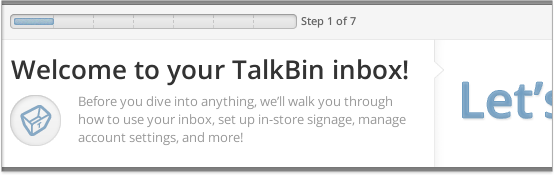
1) Getting started tutorial

When you log in to TalkBin, you’ll be welcomed with a handy educational tutorial that explains all the most important features. This makes learning how to use TalkBin a cinch for you and your employees.


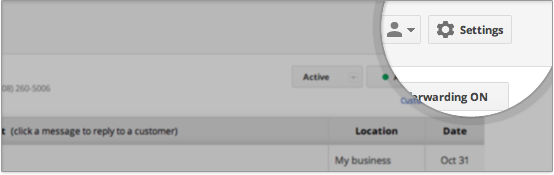
2) Updated dashboard

Based on your feedback, we updated the user interface with a fresh new design that helps you to manage all of your settings in one convenient place. For example, now your Account Settings are just one click away from Location and Billing Settings.


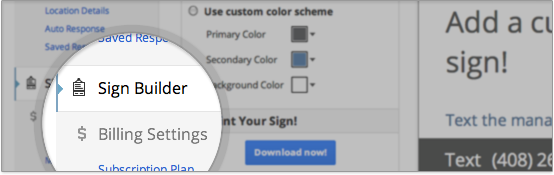
3) Custom sign builder

In-store signs are key to getting quality feedback from your customers. The new sign building feature help you make and print custom signs in just a few minutes.


To learn more about how TalkBin can help your business, check out these firsthand perspectives from Fraiche Yogurt and P. Terry’s Burger Stand.

Also, for the rest of the month, Google Small Business Blog readers can get TalkBin for just $5/month per location (discounted from the regular $25/month per location). Just enter promotion code BLOGSMB when you sign up at talkbin.com/signup/user/. This offer expires December 31, 2011.

Posted by Qasar Younis, Product Manager, TalkBin
Read More
Posted in TalkBin | No comments

Monday, 5 December 2011

Pedal to find your dream home with Google Maps

Posted on 09:33 by Unknown
(Cross-posted on the Lat Long Blog.)

The features available in Google Maps are equally functional and fun. You can tour distant cities with Street View or map out a trip with multiple destinations using Custom Maps. Not only is Google Maps a great tool for everyday personal use, but it’s can also be used as a practical business tool. Such is the case for Matt Kolb, owner of Pedal to Properties.

Matt is an avid cyclist and a realtor based in Boulder, Colorado. In 2006, Matt decided to blend his hobby and career by founding his own real estate agency called Pedal to Properties. His company is built on the idea that by touring homes via bicycle, one can get a better sense of the local community and determine if a particular property is the right fit.


When Matt meets with clients, he locates various properties on Google Maps and creates a biking route of the houses they’ll visit that day, using Bicycling Directions as a guide. Home buyers are encouraged to interact with the map, using Street View to check out a property and its surrounding neighborhood, and using nearby search to take a look at local schools and businesses. Through this process Matt is able to narrow down viable homes for a specific buyer, making the experience enjoyable and time-efficient.

If you have interesting stories about how you use biking directions, Street View, or other Google Maps features to enhance your business, comment on our Google+ Page with #mygmapstory

Posted by Dave Kim, Product Marketing Manager
Read More
Posted in Google Maps, Google+ | No comments
Newer Posts Older Posts Home
Subscribe to: Posts (Atom)

Popular Posts

  • Helping small businesses grow on the web: Teaming up with Chase for Mission Main Street Grants
    We know that every small business has big ideas for what they want to do next. Maybe you’d like to expand your store, hire more employees, o...
  • Announcing Reviews in Google Places for Business
    People come to Google to search for information about local shops and restaurants so they can make the best plans and purchases. That’s why ...
  • Sending your customers holiday cheer with Google Maps
    I love walking around my neighborhood during the holiday season and seeing all of the winter and holiday decorations adorning the storefront...
  • 10 in 10: Gmail
    Editor’s note: For the 10th month of the year, we’ll be sharing 10 tips each week for using a different Google product. Our first post featu...
  • Five for Drive: Tips for Getting Started with Google Drive
    Editor’s note: Over the next few weeks, we’ll be sharing tips on how your business can get the most out of Google Drive. This week, learn th...
  • The more you know: switching to Gmail like a pro
    [Cross-posted from the Google Enterprise Blog ] Every day, tens of thousands of people switch from Microsoft Outlook® and other client-based...
  • Check out your new image ads from the AdWords Display Ad Builder
    ( Cross-posted on the Inside AdWords blog .) Image and video ads on the Google Display Network can have a strong impact on the success of ...
  • Manage multiple locations more easily with a new tool for Google Places
    Businesses with multiple locations have a big task in front of them when trying to manage their online presence. How can they connect their ...
  • Going Google across the 50 States: Pharmacy Development Services communicating from Florida and beyond
    [Cross-posted from the Google Enterprise Blog ] Editor’s note: Over 3 million businesses have adopted Google Apps . To share their stories,...
  • Help Desk Hangouts: Engaging with your customers using social media
    Editor’s note : Each week on the Google+ Your Business page, we’re putting you in touch with Googlers and users who can help you as a busin...

Categories

  • AdSense
  • AdWords
  • Adwords Express
  • Apps Marketplace
  • Business Photos
  • Chromebooks
  • consumer surveys
  • Enhanced Campaigns
  • Events
  • Gmail
  • GoMo
  • Google AdSense
  • Google AdWords
  • Google Analytics
  • Google App Engine
  • Google Apps
  • Google Apps Marketplace
  • Google Calendar
  • Google Docs
  • Google Forms
  • Google Maps
  • Google Offers
  • Google Places
  • Google Sites
  • Google Tags
  • Google+
  • Google+ stories
  • googlenew
  • Help Desk Hangouts On Air
  • Hotpot
  • Learn with Google
  • mobile
  • Newsletter
  • Online security
  • Picasa
  • Street View
  • TalkBin
  • Webmaster Academy
  • YouTube

Blog Archive

  • ▼  2013 (45)
    • ▼  November (1)
      • Announcing Reviews in Google Places for Business
    • ►  October (4)
    • ►  September (1)
    • ►  August (2)
    • ►  July (5)
    • ►  June (2)
    • ►  May (9)
    • ►  April (3)
    • ►  March (4)
    • ►  February (4)
    • ►  January (10)
  • ►  2012 (120)
    • ►  December (15)
    • ►  November (9)
    • ►  October (15)
    • ►  September (13)
    • ►  August (10)
    • ►  July (3)
    • ►  June (10)
    • ►  May (17)
    • ►  April (10)
    • ►  March (9)
    • ►  February (7)
    • ►  January (2)
  • ►  2011 (70)
    • ►  December (3)
    • ►  November (2)
    • ►  October (6)
    • ►  September (3)
    • ►  August (2)
    • ►  July (1)
    • ►  June (5)
    • ►  May (12)
    • ►  April (9)
    • ►  March (8)
    • ►  February (12)
    • ►  January (7)
  • ►  2010 (104)
    • ►  December (25)
    • ►  November (24)
    • ►  October (17)
    • ►  September (20)
    • ►  August (18)
Powered by Blogger.

About Me

Unknown
View my complete profile